
I used to waste so much of my day on “digital busywork.” You know what I’m talking about. The little, annoying computer tasks that aren’t really work, but they take up so much time and mental energy.
Things like trying to email a huge file, figuring out how to sign a document without a printer, or trying to combine three different files into one. I would just brute-force my way through them, assuming that this was just the clumsy way things had to be done.
Then I discovered the world of simple, browser-based online tools. These are the digital equivalent of having a Swiss Army Knife on your computer. They are small, free, do-one-thing-perfectly websites that can turn a 15-minute headache into a 30-second solution.
If you’re still doing these 11 common tasks the old, slow way, you’re about to get a huge chunk of your day back.
1. Sending a File That’s Too Big for Email
- The Slow Way: You try to attach a big PDF or a folder of images, get the “file too large” error, and then spend 10 minutes trying to figure out how to use a clunky file-sharing service.
- The Fast Way: If it’s a PDF, run it through a Compress PDF tool. It will shrink the file down to an email-friendly size in seconds.
2. Combining Multiple Documents into One
- The Slow Way: You have a cover letter, a resume, and a portfolio as three separate PDFs. You either send them as three attachments (a little messy) or you try to copy and paste everything into one giant Word doc, which breaks all the formatting.
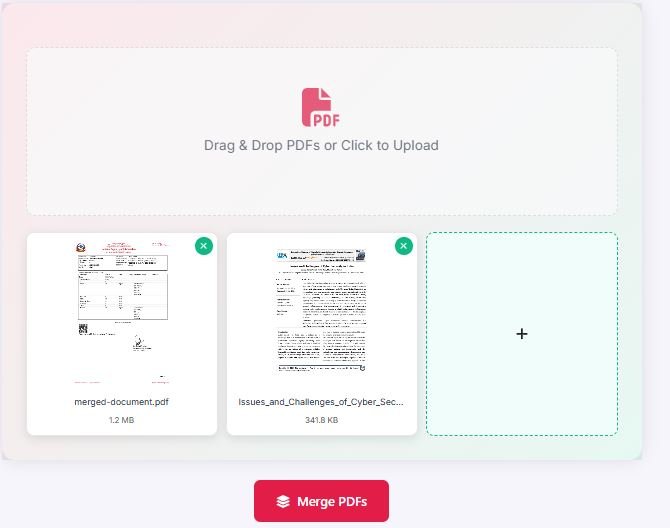
- The Fast Way: Use a Merge PDF tool. Drag all three files in, put them in the right order, and combine them into one professional-looking document.
3. Getting Rid of Useless Pages in a PDF
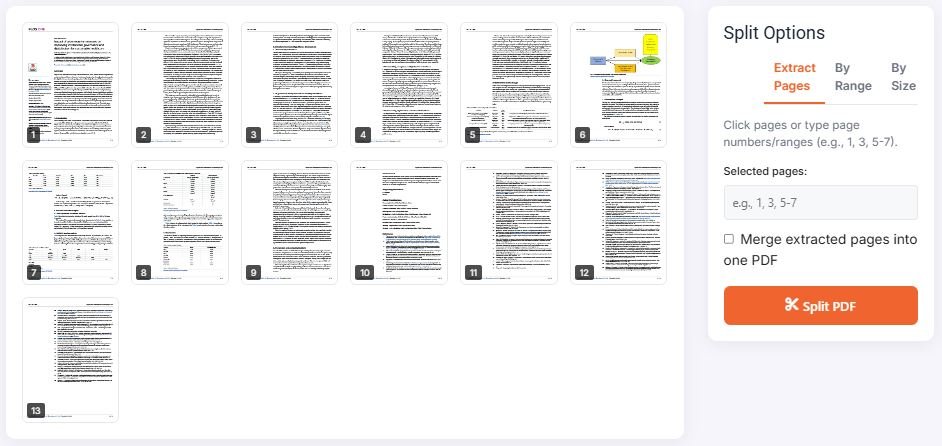
- The Slow Way: You download a 20-page report, but you only need pages 5-8. You either live with the big, clumsy file or you take screenshots of the pages you need, which look terrible.
- The Fast Way: Use a Split PDF tool to extract just the pages you need. Or, use an Organize PDF tool to visually delete the junk pages.
4. Signing a Document Without a Printer
- The Slow Way: Print the document, sign it with a pen, find a scanner, scan it back to your computer, and then email the (often crooked and blurry) scan.
- The Fast Way: Use an online “eSign” tool. You upload the document, draw your signature with your mouse or finger, and download a legally binding, digitally signed version.
5. Converting a Word Doc to a PDF
- The Slow Way: You hunt for the “Save As” or “Export” function in Microsoft Word, which is often buried in different menus depending on your version.
- The Fast Way: Use a Word to PDF converter. Just drag your .docx file into the browser, and it’s done.
6. Fixing a Document That’s Scanned Sideways
- The Slow Way: You open the sideways PDF in a clunky preview program and spend five minutes trying to find the “rotate” button in the menu bar.
- The Fast Way: Use an Organize PDF tool. You’ll see a preview of all your pages, and you can just click a button to rotate the ones that are wrong.
7. Unlocking a PDF You Own
- The Slow Way: You have a bank statement that you need to send to your accountant, but it’s password-protected. You have to send the file and then send a separate, awkward email with the password.
- The Fast Way: If you have the password, use an Unlock PDF tool to create a new, unprotected version of the file that you can easily share.
8. Adding Page Numbers to a Report
- The Slow Way: You realize your merged report doesn’t have continuous page numbers. You consider going back to the original files, adding them manually, and then re-merging everything.
- The Fast Way: Use a Page numbers tool. Upload your final PDF, choose where you want the numbers to go, and it will add a clean, sequential set of page numbers to the entire document.
9. Fixing a Corrupted File
- The Slow Way: You try to open a PDF and get a “file is damaged” error. You assume it’s gone forever and ask the sender for a new copy, which can be slow and awkward.
- The Fast Way: Try to fix it first. Run the file through a Repair PDF tool. It can often rebuild the broken parts of the file and save the day.
10. Cropping Out Unwanted Margins
- The Slow Way: A scanned document has huge, ugly black borders around the edges. You just accept it and send the unprofessional-looking file.
- The Fast Way: Use a Crop PDF tool. You can draw a box around the exact area you want to keep and instantly trim away all the junk on the outside.
11. Taking a Screenshot of a Whole Webpage
- The Slow Way: You try to screenshot a long webpage, but you can only capture the part you can see. You end up with 5 different image files that you have to stitch together.
- The Fast Way: Use a browser extension like GoFullPage. One click and it will automatically scroll down the entire page and capture it as a single, clean image or PDF.
Your time is valuable. Stop wasting it on digital friction. By bookmarking a few of these simple online tools, you can automate the boring stuff and get back to the work that actually matters.

